




Print n Share
iPhone & iPad Printing:
There’s an App For That
As seen in Apple's "Office" TV Advertisement (click here to view)
Wouldn't it be great just to print out an Email or an iPad or iPhone contact address and phone number, or quickly print out a web page to read later? Move files to or from your computer and print them. How about printing photos from your iPad or iPhone Photo Album? Or even take a picture and print it out straight away. Now you can!
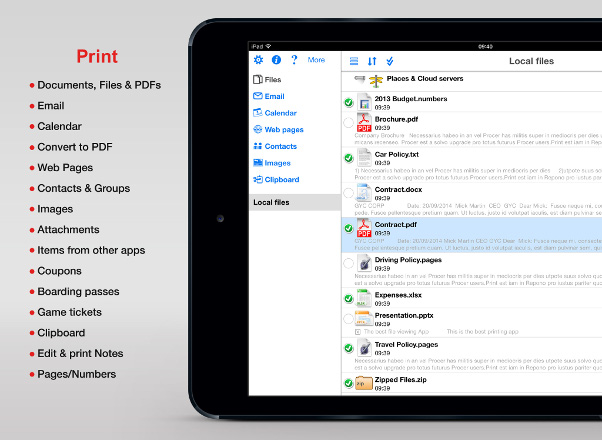
“Print n Share” for the iPad, iPhone and iPod Touch is the best printing and file sharing app. It enables you to print emails, files, web pages, contacts and images and also shares files and documents with your desktop computer.
Print n Share will print direct to most WiFi printers, or to ALL printers (Bluetooth, USB, WiFI, Network) via your Mac/PC using the free WePrint software. If WePrint is required on your Mac or PC you will not need to touch or be near your computer to print, you simply tap print on your iPad, iPhone or iPod Touch and the computer will act as a relay and automatically pass the print job from your device onto your printer without user intervention.
Installing WePrint on your Mac or PC will also give you the ability to print via 3G/4G, so even when you are out of your office/home you can quickly and easily send print jobs to your printer from your iPad, iPhone or iPod Touch.
Videos



Features
Fully Functional Printing with Options
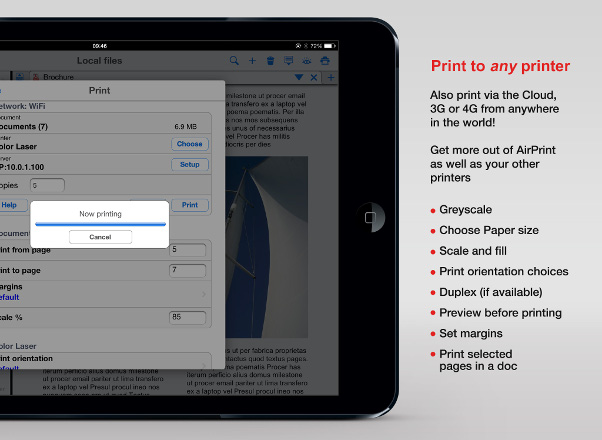
- Print direct to most existing WiFi or shared printers, or use the free printer software for ALL printers
- USB & Bluetooth printers can be used with free print server software
- Also print to AirPrint printers
- Print remotely via 3G/4G
- Print using ALL the same document formats to ALL printers that can used by your Mac/PC (e.g. USB, WiFi, Bluetooth, shared, networked etc.)
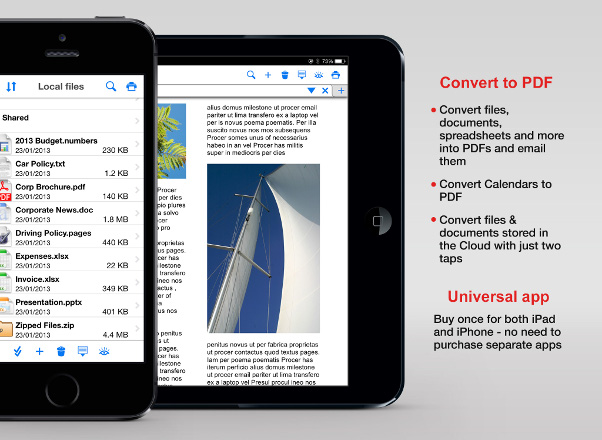
- Convert documents to PDF files
- Print via Google Cloud Print
Print from Pages, Numbers or Keynote to ANY printer
- Use "Open in Another App" to print in just a few taps
- Print all your documents and files to ANY existing printer
Calendar Viewing and Printing
- Calendar viewing and printing
- Utilizes existing calendar entries
- View by Day/Week/Month
- Handy Month drop-down view
- Easily create new appointments
- Integrated with Exchange, Apple and Google Calendars
- Print email and attachments
- Access multiple email accounts
- View favorite email accounts together in a single inbox
- Save emails and attachments
- Attach multiple files and images to new emails
- Send emails with formatted text and embedded images
- Insert contact details into emails
- Forward and reply to emails
- Full screen viewing of emails
- Queue emails for sending later
- View queued and sent emails
- Supports virtually all email accounts
- Supports Exchange EWS or Exchange 2007, 2011, 2013
- Filter IMAP/OWA email by date
Documents
- View/Print Micosoft Office files
- View/Print iWork Pages, Numbers & KeyNote files
- Store documents, attachments and images
- Zip/Unzip files directly on your
iPad/iPhone/iPod Touch
- View files/documents in portrait, landscape and full screen mode
- Playback iPad or iPhone supported audio and video files
- Edit and print text documents
- Group files into folders
- Drag and drop files and folders to arrange
- Navigate through your computer’s folders to find files
- Copy whole folders from your computer
- Fully integrated with Evernote
- Share files with several Macs and PCs, even remotely
Print to PDF
- Convert common file formats into a PDF
- Save Web pages as PDFs
- Email PDFs directly from within the app
- Use "Open in..." to transfer files from other apps & make them into PDFs (other app will need to support "Open in...")
WiFi Hard Drive
- Mount your iPad/iPhone/iPod Touch as a network disk on your Mac/PC
- Drag and drop documents & files to/from your iPad/iPhone/iPod Touch
- Open, view & send documents and files while away from your Mac/PC
Cloud Services
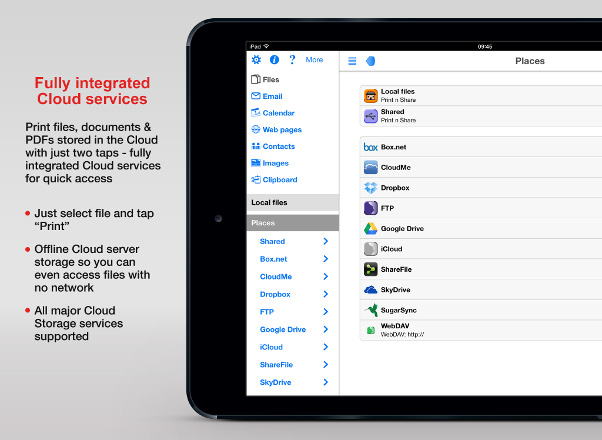
- Google Drive
- Box
- ShareFile
- SugarSync
- CloudMe
- CloudMe
- DropBox
- SkyDrive
- Transporter
- FTP servers
- WebDAV
Print contacts
- Select multiple contacts for printing
- Print as combined list or card layout
- Insert contact details into emails
- Add received email addresses to your contacts
- Search for contacts
- Sort by first or last name
Photos
- Print photos
- Select and print multiple photos from your album
- Use the camera to take photos and print straight away
- Save photos as files for viewing or emailing
- Move photos to a folder on your computer
- Email photos as attachments or embedded in messages
- Select print orientation and size before printing
- View photos in full screen mode
Web Pages
- Print from Safari by inserting a z before http for any web page
- Copy and paste web pages which will retain formatting
- Print web pages as you are browsing within the app
- Send web pages as email attachments
- Full screen browsing view
- Save web pages as files for printing or viewing later
- Save page bookmarks
- Import bookmarks from your PC or Mac
- Bookmark folders
- Forward and back navigation
Clipboard Archive and Transfer
- Copy and print items from other apps
- Copy & transfer to another iPad/iPhone
- Copy & transfer to your PC/Mac via WiFi
- Copy & transfer from your PC or Mac
- Archive clipboard items
- Transfer clipboard via Bluetooth
Advanced Email
- IMAP sync for sent/deleted emails
- Email search multiple fields for filtering
- View emails belonging to each contact
- Move emails to IMAP server folders


Independent Media Reviews
iGeeksBlog:
"...exceptionally convenient printing for business or personal"
AppShouter:
"The all-in-one office app!"
appbite:
"Both printing and sharing work great"
The Gadgeteer:
"This is a pretty powerful application"
suite101.com:
"Print n Share is incredibly easy to use"
TechCrunch:
"The 35 Best iPhone apps of the Year"
Appvee:
"Print & Share" is truly an amazing application
MyMac:
"Print and Share is a must have"
MacWorld:
"Solves the iPhone's printing problem"
Epson:
"Print & Share makes printing available to all"